internal control system (ICS)
HITGuard ’s internal control system (ICS) provides support primarily in the areas of risk treatment and risk monitoring: It ensures that risk treatment measures are processed and documented systematically and in accordance with established workflows. It also ensures that the implementation of measures is regularly monitored. Through controls , the sustainability of risk treatment is ensured over the long term. These features are also of the utmost importance in compliance management and in the follow-up work after completed audits.
- Workflow-Based Processing of " measures" and Control Tasks
- Documentation of all steps from implementation to audit behavior
- Regular assessment of current progress on measures
- Detailed, traceable logs of the tasks performed controls
- Key figures and meaningful reporting, including a risk-control-matrix
controls
Create controls to ensure, for example, that policies are followed or that potential vulnerabilities are assessed. A control is a recurring task, and those responsible for carrying it out can be reminded at regular intervals. controls can be approved or rejected by one or more reviewers. Furthermore, the quality of the execution of controls can be evaluated, thereby assessing the maturity level of the associated processes.
- Determine the frequency of the " controls " and any deadlines for implementers and reviewers.
- Schedule automatic email reminders along the workflow and define escalation paths.
- Enrich your evaluations by linking standards and norms with control.
control Create
- Use a clear and intuitive interface to define the controls to be performed, including any attachments.
- Highlight key controls with defined thresholds and dedicated escalation paths in their priority.
- Assign one or more examiners to the " controls " and specify how the examinations are to be conducted.
control carry out
- In accordance with the principle of minimum information, share only the information with the implementers who need it.
- Receive not only the implementation description from the implementers, but also additional evidence as proof of implementation.
- As the implementer, forward your completed control workflow-supported to the inspector(s).
control check
- As the reviewer, accept the implementation of control or return it to the implementers for revision.
- Document your work steps with comments when accepting, rejecting or returning a control.
- Maintain an overview with the historicized test and change logs for each control.
measures
Create " measures" to, for example, correct discrepancies identified in analyses or address reported vulnerabilities. A " measure " is a one-time task, and those responsible can be repeatedly reminded to complete it before the deadline. Progress on implementing these measures is proactively reported by those responsible or requested by experts. The experts then approve or reject the feedback.
- Record the event that led to the need for measure being recognized and thus increase its traceability.
- Define whether it is a matter of correcting or improving a recognized circumstance.
- Enrich your evaluations by linking standards and norms with measure.
Create a measure
- Create measures either immediately or in advance for planned, future implementation.
- Use a clear and intuitive interface to define the measures to be implemented, including the individuals responsible for them.
- Define the planned time horizon for the implementation of measure using the start date, end date and plan date.
Report progress
- Report progress in action implementation on demand or proactively at the touch of a button.
- Add evidence as an attachment to the percentage progress and detailed status updates.
- Delegate progress messages to clerks who can answer the queries for you.
Acceptance of measures
- Manage links to any review questions that need to be reevaluated as a result of the implementation of measure .
- Automatically send reminders to stakeholders for pending progress messages.
- See the entire implementation history at a glance directly at measure.
Comprehensive documentation and reporting
HITGuard provides all documentation and a wide range of reports for the various management systems you may operate. The KPIs and reports for measures and controls enhance not only your internal control system (ICS) but also your compliance management, risk and audit management, as well as the Data protection within your company. Dashboards allow you to compare key performance indicators across multiple analysis periods. This makes it easy to identify trends in management systems. The history and progress of the management system—for example, with regard to risk management—are tracked in a transparent and traceable manner and can thus be used for risk monitoring, among other purposes.
- Comply with your reporting obligations with documentation that can withstand the requirements of certification or audit.
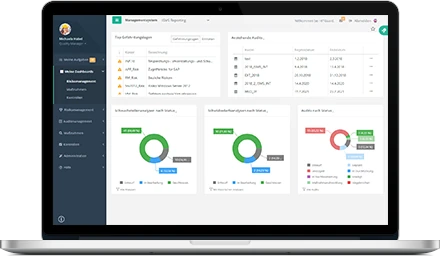
- Export graphs from configurable dashboards or print reports with content that you can customize to suit your needs.
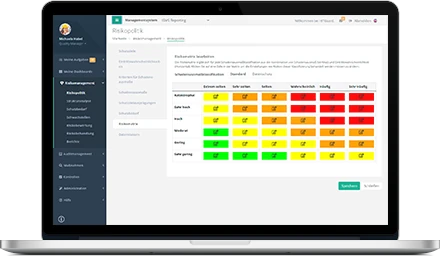
- Filter and analyze threat situations and related controls in a dedicated risk-control-matrix.
Request a non-binding demo now
Find out what the GRC software HITGuard can do for you
Learn more about other modules from HITGuard!
Where " HITGuard " has already proven itself, among other things
Construction industry
approx. 20,000 employees
Auditor
approx. 700 employees
Health service
approx. 18,000 employees
IT Security Solutions
approx. 100 employees
IT Security Solutions
approx. 100 employees
Software House
approx. 400 employees
Event Management
approx. 500 employees
Hospital Operators
approx. 1,600 employees
approx. 6,000 employees
IT Service Providers
approx. 40 employees
Is your industry not listed? Do you need more information? We would be happy to put together individual reference examples for you – please contact us.